Release
plugins to SVN
from a calm, native Mac app
Release WordPress.org plugins and any SVN repo from a calm, native Mac app. Connect by URL, manage assets, and ship with one click. No Terminal.
Free & MIT · macOS 14+ · Apple Silicon & Intel · v1.0.3 · 1.6 MB
728 downloads and counting
Release Acme Plugin
acme-plugin
Off: the release is blocked if the tag already exists (default, safer). On: SVNRel will replace the existing tag if it already exists.
Using saved svn credentials · enter a different password
Preflight
all green- ✓
- ⠋
Live Output
0 linesThe Assets Manager
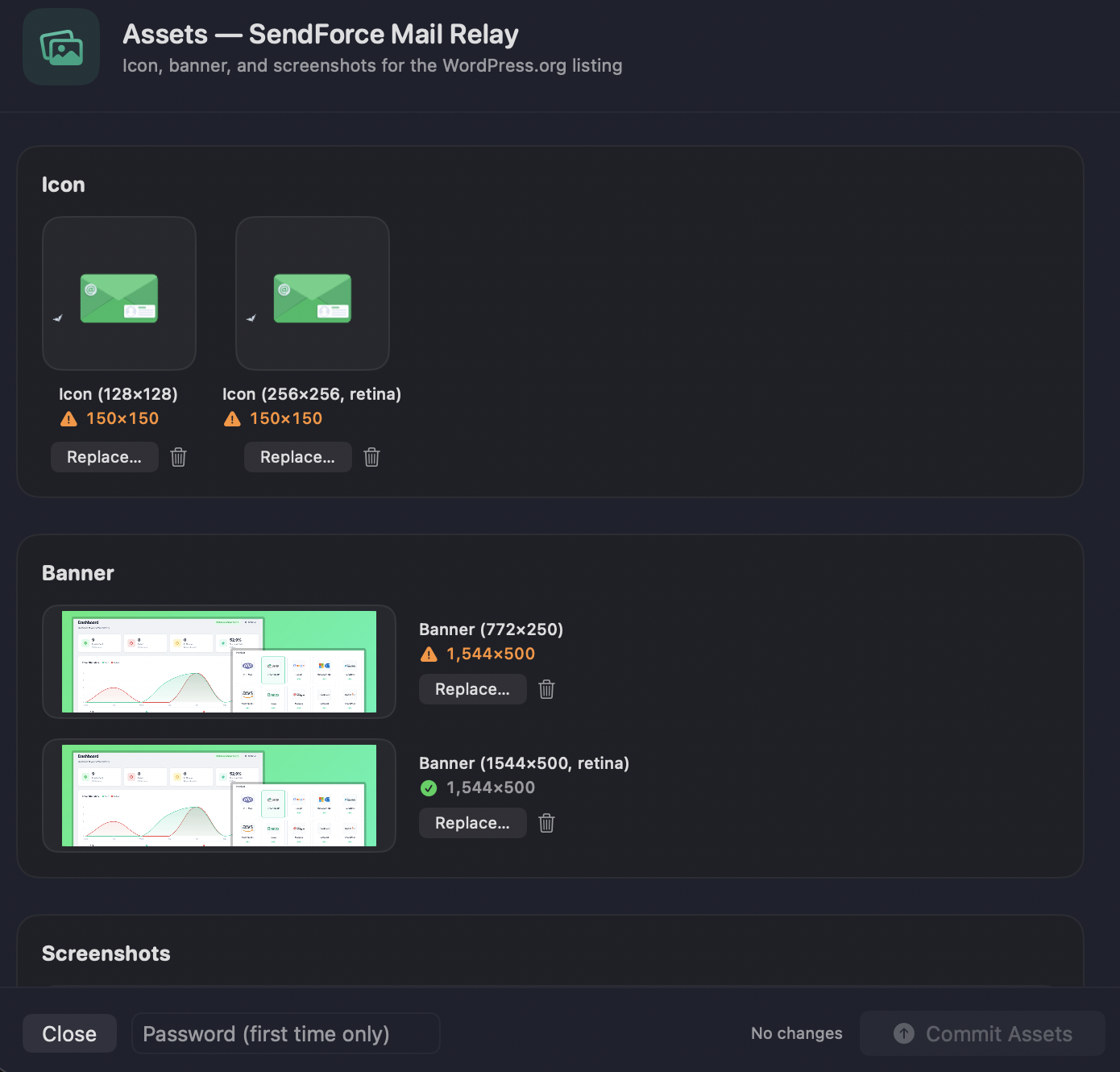
Managing a plugin’s WordPress.org icon, banner and screenshots is the fiddliest part of releasing, and the easiest to get wrong. SVNRel makes it simple.
- Drop in images, no SVN commands, no separate checkout
- Live dimension validation catches wrong-size icons and banners before you commit
- Push everything to the /assets/ folder in one click
- See exactly what’s on WordPress.org vs. what’s local
Built for the way you actually ship
Connect by URL, manage assets, and release with confidence, the parts raw SVN makes painful, handled for you.
Connect an existing plugin in seconds
Already on WordPress.org? Paste your plugin URL or slug and SVNRel auto-pulls the name, current version, release history and SVN URL, then checks out the working copy for you. No manual setup.
Assets Manager
Manage your plugin’s WordPress.org icon, banner and screenshots without ever touching SVN. Live dimension validation catches wrong-size images before you commit, then pushes them to the /assets/ folder in one click.
Release history
Every release and asset commit is logged, with version, outcome, SVN revision and date. Glance at any project to see exactly what you shipped and when.
Live release tracker
Watch each release move through Validate, Prepare, Sync, Tag and Commit with a live step tracker and a real-time terminal showing every svn and rsync line.
Connect any SVN repository
Not just WordPress.org. Point SVNRel at any SVN repo with per-project credentials stored in the macOS Keychain, plus optional self-signed-certificate support for internal servers.
Built-in guardrails
Preflight validates the version match across your .php header, readme.txt Stable tag and the requested version, checks whether the tag exists, and confirms credentials. The Version Bumper fixes mismatches in one click, with overwrite protection and retry on failure.
Your projects, your way
Drag to reorder projects in the sidebar. Choose where checkouts live (a tidy ~/SVNRel folder by default, fully configurable). Reveal any working copy in Finder and copy any path or URL with one click.
Secure by design
Credentials live only in the macOS Keychain, never written to disk or sent anywhere except your SVN server. Touch ID authorizes each release.
Everything a release needs, in one Mac app
From adding a project to a committed, tagged release, every step of the WordPress.org and SVN workflow, done natively. 53 features across 7 categories.
Project management
12 features in this category
- Two project types WordPress.org plugins and generic SVN repositories, managed in one app.
- Add Project wizard Guided setup with a project-type picker, source-folder picker and icon chooser.
- Auto-detection Reads your plugin's main .php header to auto-fill name, version and main file.
- Slug validation Live checking against WordPress.org slug rules as you type.
- Edit any project Change display name, source folder, SVN URL, checkout path, icon or credentials anytime.
- Editable SVN URL Override the auto-derived WordPress.org URL (e.g. a staging server) with one-click reset to default.
- Editable checkout folder Reuse an existing local working copy or pick a custom location.
- Drag-to-reorder Arrange projects in the sidebar; the order is saved.
- One-click refresh Re-reads the source version and queries WordPress.org for the latest released tag.
- Right-click menu Edit, Refresh, Reveal Source, Open WP.org page, Open SVN URL, Remove.
- Persistent & private Projects saved locally in projects.json with user-only file permissions, restored on launch.
- Remembers your selection Your last-selected project is restored across launches.
Guided release flow
11 features in this category
- Preflight checks Validates svn installed, source folder, plugin header, .php Version: match, readme.txt Stable tag: match, credentials, and whether the tag already exists on the remote.
- Version bumper Detects a version mismatch and rewrites the .php Version: header and readme.txt Stable tag: in one click.
- Dry-run preview See exactly what would sync without touching the remote.
- One-click commit A full release in one go: check out or update, sync your source to trunk, create the tag, and commit.
- Live activity log Every SVN and rsync step streams in real time, color-coded info / success / warning / error.
- Overwrite existing tag Opt-in toggle to safely replace an existing tag (removed and re-created in separate commits).
- Cancel mid-release Stops the running operation and terminates the subprocess.
- Retry on failure Re-run a failed release without reconfiguring.
- Confirmation guard A clear confirm dialog before any commit, with a stronger warning for overwrites.
- Success summary Green confirmation with the committed revision number and one-click links to the WP.org page and SVN tag.
- Quit protection Warns if you try to quit while a release is in progress.
WordPress.org integration
5 features in this category
- Live plugin stats Active installs, total downloads, star rating and last-updated, from the official WordPress.org API.
- Rich metadata Tested up to, Requires WP, Requires PHP, Stable tag, Author, Text domain, License, Contributors and Tags.
- Smart caching 1-hour cache with a manual refresh button.
- Graceful states Clear "not yet published" and offline messages.
- Open the plugin page Jump to the WordPress.org plugin page directly from the app.
Security
5 features in this category
- macOS Keychain Credentials never touch disk or get logged; only sent to your SVN server.
- Touch ID / Face ID Biometric authorization for each release.
- Per-project credentials Generic SVN repos get their own stored login; WordPress plugins share your WP.org account.
- TLS verified by default With an opt-in "trust self-signed certificate" toggle for internal SVN servers.
- Hardened storage Config files written with user-only permissions.
Native engine
6 features in this category
- No Terminal, no scripts Calls svn and rsync directly with structured, cancellable operations.
- Auto-locates svn Finds svn across Homebrew, MacPorts and system paths.
- Smart checkout Checks out automatically if missing, updates if present.
- Safety excludes Never ships .git, .svn, .DS_Store or dev files; honours your .distignore.
- Junk scrubbing Strips .DS_Store and ._* files before every sync.
- SVN reconciliation Handles added and removed files automatically.
Interface & experience
9 features in this category
- Native Mac design Sidebar + detail split view, a calm minimal aesthetic, dark-mode friendly.
- First-run onboarding Welcome tour, system check (detects svn, offers the install command), account setup, biometric opt-in.
- Settings WP.org account, password management, biometric preference, storage location, About.
- Copy-to-clipboard One-click copy with a checkmark on every path and URL.
- Finder & repo shortcuts Reveal in Finder and Open SVN/Repo in one click.
- macOS notifications A banner when a release succeeds, even in the background.
- Keyboard shortcuts ⌘N add project, ⌘R refresh, ⌘, settings.
- Help menu Re-run the welcome tour, open developer/sponsor sites.
- Polished details Custom app icon and a proper About panel with version and credits.
Platform & distribution
5 features in this category
- Universal binary Runs natively on Apple Silicon and Intel.
- macOS 14 (Sonoma)+ Built for modern macOS.
- Free & MIT licensed No accounts, no trials, no upsells.
- Direct DMG download Drag-to-Applications installer, no Mac App Store needed.
- Lightweight ~1.3 MB download with no bundled runtimes.
A calm, native workspace for releases
The release sheet, settings, and both Add-Project wizards, all in Mac-native dark mode.
Three steps to a shipped release
Connect your plugin
Paste your WordPress.org URL or slug (or pick a folder for a generic repo). SVNRel pulls the details and checks out the working copy for you.
Preflight & bump
Preflight validates everything and flags mismatches. The Version Bumper fixes your .php header and readme.txt Stable tag in one click.
Release with live progress
One click runs the full release, syncing to trunk, tagging and committing, with a live step tracker and real-time terminal.
SVNRel vs. Cornerstone
Cornerstone is the gold-standard premium SVN client for Mac — it manages any repository. SVNRel does one thing perfectly: ship your WordPress.org plugin — the whole checkout → trunk → tag → commit dance becomes one click, with the plugin-specific checks a generic client can't do.
| Feature | SVNRel Free · MIT | Cornerstone Premium Mac SVN client |
|---|---|---|
| Release workflow | ||
| One-click plugin release (trunk + tag in one flow) | Manual steps | |
| Auto checkout / update working copy | ||
| Syncs source → trunk automatically (rsync) | Copy files by hand | |
| Auto svn add / svn rm for new & deleted files | − | |
| Creates the version tag for you | Manual svn cp | |
| Pre-flight checks before you commit | − | |
| Dry-run preview (see changes, commit nothing) | ||
| Live release tracker + terminal log | Raw output only | |
| Safe tag overwrite with rollback warning | − | |
| Transient-error detection ("just retry") | − | |
| WordPress.org specifics | ||
| Plugin version validation (header + readme Stable tag) | − | |
| Built-in version bumper (.php + readme.txt) | − | |
| Assets manager — icon / banner / screenshots | − | |
| Correct WP.org asset naming & dimension validation | − | |
| Live WordPress.org stats (installs, downloads, rating) | − | |
| Connect an existing plugin by URL / slug | Manual checkout | |
| Auto-cleans .DS_Store / junk, respects .distignore | − | |
| Release history log | via svn log | |
| Experience | ||
| No Terminal required | CLI / steep UI | |
| Native, focused macOS app | ||
| Global login — set password once, never re-asked | Varies | |
| Out of scope for SVNRel | ||
| Full diff / blame / merge / branch tools out of scope | − | |
| Works with any SVN repo (not just plugins) Generic repos supported, plugin extras off | ||
| Conflict resolution UI | − | |
In short
- Release a new plugin version in one click — no svn cp, no copying files
- Catches version mismatches before you publish
- Manage icon, banner & screenshots with the right names and sizes
- See installs, downloads & ratings without leaving the app
- Set your SVN password once — never type it again
Comparison reflects each tool's focus for the WordPress.org / SVN release workflow. Cornerstone is a trademark of Zennaware Ltd. — not affiliated with SVNRel.
Get SVNRel for Mac
Free, MIT-licensed, direct DMG download. No App Store. No account. No tracking.
728 downloads so far
Requirements
-
✓
macOS 14 (Sonoma) or laterApple Silicon & Intel — universal binary
-
✓
Subversion installed
-
✓
1.6 MB downloadFree forever · no in-app purchases
First launch one time
SVNRel is unsigned (normal for indie Mac apps). macOS asks once — quick and harmless.
-
1
Open the DMG and drag SVNRel into Applications.
-
2
In Applications, right-click SVNRel, then choose Open.
-
3
Click Open in the dialog. From now on it launches with a normal double-click.
Frequently asked questions
Yes, SVNRel is completely free and open under the MIT License. No accounts, no trials, no upsells.
macOS shows an “Apple could not verify SVNRel” (or “unidentified developer”) warning the first time you open it. That’s expected: SVNRel is free and open-source, distributed outside the Mac App Store, so it isn’t signed with a paid Apple Developer certificate. The app is safe — this is just macOS Gatekeeper’s standard prompt. To open it (one time only): 1. Open the DMG and drag SVNRel into your Applications folder. 2. Double-click SVNRel. When the warning appears, click Done. 3. Open System Settings → Privacy & Security, scroll down to the Security section, and click “Open Anyway” next to SVNRel. 4. Confirm with Touch ID or your password, then click Open. After this one-time step, SVNRel launches normally with a double-click. On macOS Sonoma you can instead right-click the app in Applications → Open → Open.
Yes. Alongside first-class WordPress.org plugin support, you can add any generic SVN repository by URL, with credentials stored per project in the macOS Keychain. SVNRel syncs your source into trunk/, tags the version, and commits.
Your password lives only in the macOS Keychain. It is never written to disk and never transmitted anywhere except to the SVN server you are releasing to, over TLS.
macOS 14 (Sonoma) or later, and Subversion. If you do not have svn yet, run "brew install subversion" in Terminal once. SVNRel auto-locates svn across Homebrew, MacPorts and system paths.
Yes, SVNRel is a universal binary that runs natively on both Apple Silicon and Intel Macs.
Cornerstone (and similar paid clients like SmartSVN, or CLI tools like TortoiseSVN on Windows) are general-purpose SVN clients for browsing repositories, merging and resolving conflicts. SVNRel is a focused release tool: it automates the WordPress.org / SVN release workflow (preflight checks, version bumping, trunk sync, tagging and committing) with one click — and it is free, MIT-licensed, and native to macOS.
Yes, with an opt-in "overwrite existing tag" toggle. The old tag is removed and re-created in separate commits so the history stays clean. By default the release is blocked if the tag already exists, which is safer.

Your next release, the easy way
Stop wrestling svn on the command line. Download SVNRel and ship in a few clicks.